Are You Earning Up to Your Potential?
Most personal trainers are undervaluing their time and skills. Our Personal trainer Revenue Calculator helps you find out what you should be making, and how to get there.
No guesswork. Just real numbers.
.webp)
In the highly competitive fitness industry, distinguishing your brand is essential. But how can you ensure that your fitness business stands out among countless generic apps? The secret lies in customization. Welcome to the ultimate guide on mastering branding with App Theming on FitBudd, the leading fitness app for trainers aiming to create a custom app experience. This guide will show you how to transform your digital presence into a true reflection of your brand, captivating your clients from the very first tap.
Unveiling App Theming: Your Brand, Your Style
Picture this: your clients open your fitness app, greeted by a sleek logo, a personalized splash screen, and a seamless interface adorned with your brand's colors. With FitBudd's App Theming, this vision becomes a reality. Let's dive into the three key sections that empower you to sculpt your app's aesthetic identity.
1. App Configuration: Setting the Stage
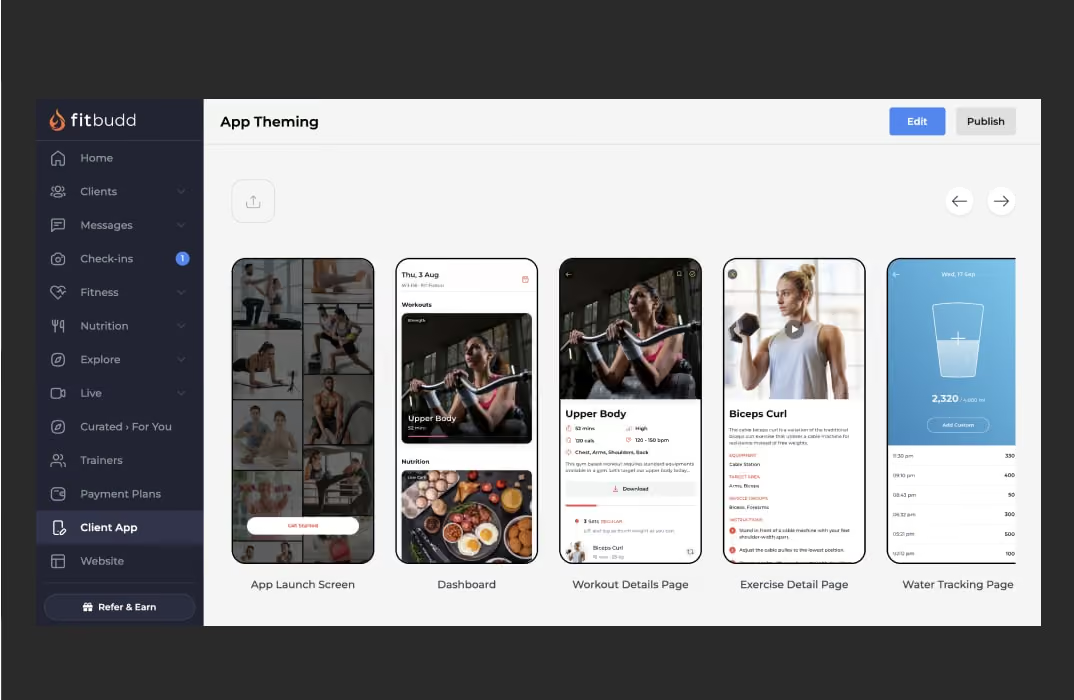
Think of App Configuration as the foundation upon which your fitness app stands. It's the first impression your clients encounter; as the saying goes, you never get a second chance to make a first impression. Here's why it's crucial:
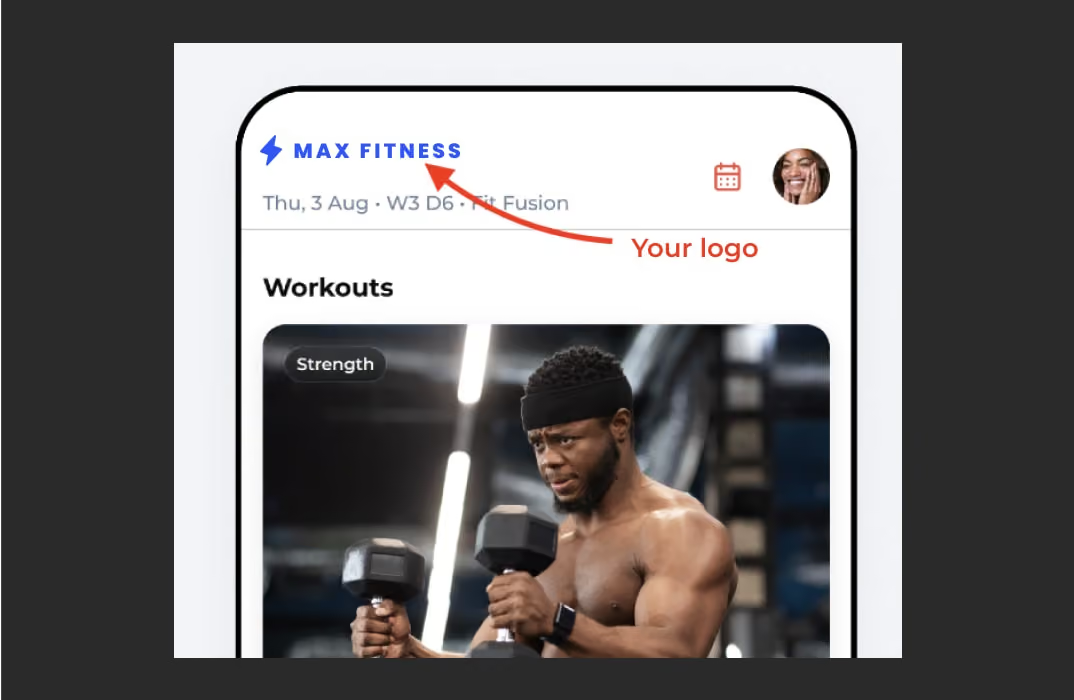
- Logo: Your fitness business logo is the face of your brand. It visually represents everything your business stands for - its values, mission, and identity. By uploading your logo through FitBudd's App Configuration, you ensure it's prominently displayed every time your clients open the app. This reinforces brand recognition and instills a sense of trust and professionalism from the get-go.
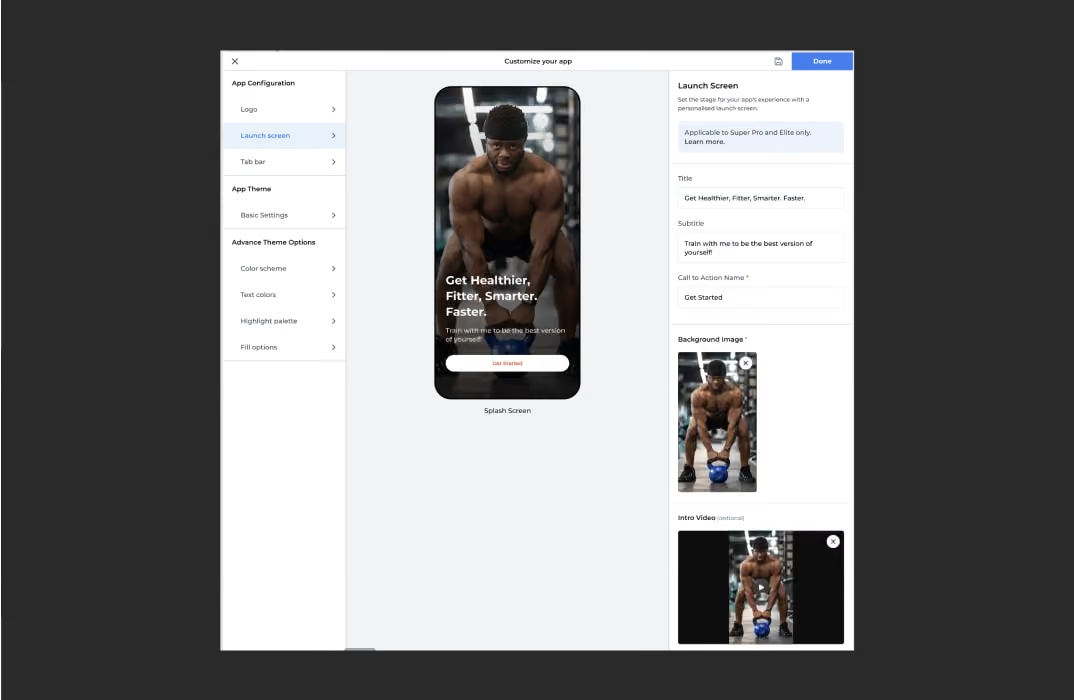
- Launch Screen: The Launch Screen sets the tone for the entire app's branding experience. It's the canvas upon which you can paint a picture of your fitness business. With FitBudd's customization options, you can add background images that resonate with your brand's aesthetic, creating an immersive experience for your clients right from the moment they launch the app. Additionally, incorporating an intro video adds a personal touch, engaging your clients and sparking excitement for what's to come.
- Tab Bar: Enhancing User Experience
As part of App Configuration, the Tab Bar guides users through your fitness app. It allows for customization by reordering tabs and modifying text labels. This feature enables you to prioritize and showcase key sections of your app, ensuring users can easily navigate and access relevant content quickly. By tailoring the Tab Bar to your fitness business's needs, you create a seamless and intuitive experience for your clients.
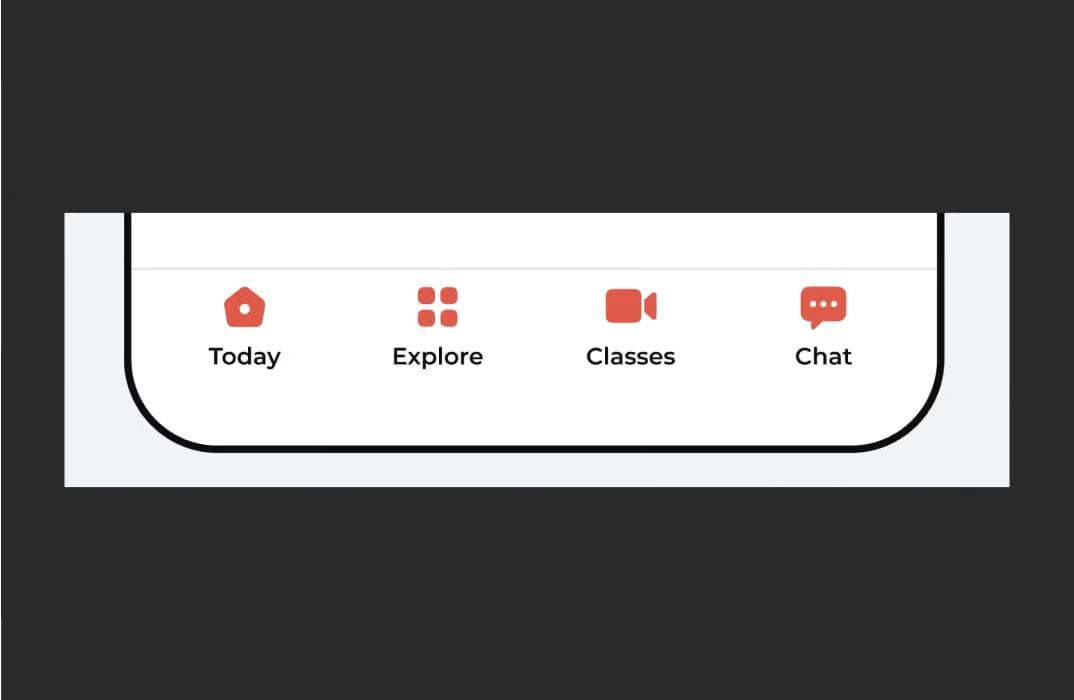
App Configuration is your opportunity to curate a captivating entrance into your fitness app, laying the groundwork for a memorable and impactful user experience.
💪 Got an idea for a brand? Let's bring it to life.
Launch your own fitness app with FitBudd in minutes!
💪 Got your brand name? Let’s bring it to life.
Launch your own fitness app with FitBudd in minutes!



88% trainers worldwide gave us 5 stars
Transform your fitness business with the power of your branded app on iOS and Android.
Try for FREE2. App Theme: Painting Your Digital Canvas with FitBudd
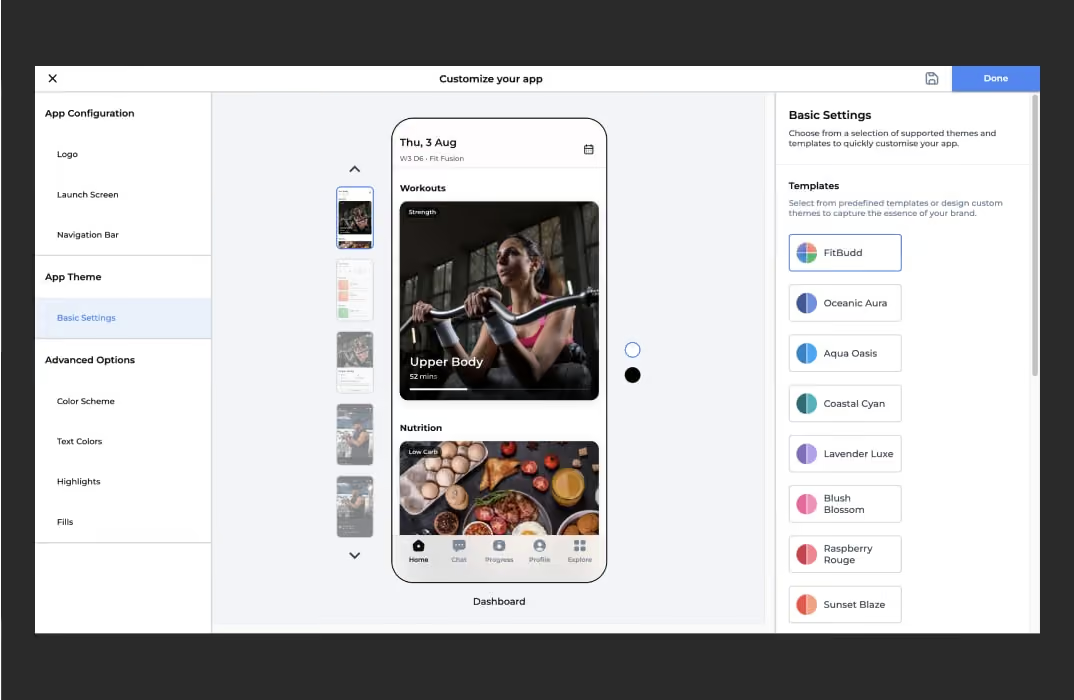
Once you've set the stage with App Configuration, it's time to dive into the heart of your app's visual identity—App Theme. This is where you can truly infuse your brand's personality into every aspect of your fitness app. FitBudd offers a range of customization options to help you create an app that is functional, visually captivating, and uniquely yours.
Templates: Ready-Made Designs to Capture Your Vibe
FitBudd provides a variety of pre-designed templates for branding that cater to different styles and themes. These templates are designed by professionals to ensure that your app looks polished and appealing right from the start. Whether your brand is sleek and modern, vibrant and energetic, or anything in between, there's a template that will fit your vision. By selecting a template that aligns with your brand, you can quickly create an app that resonates with your clients and stands out.
Theme Mode: Adapting to Your Clients' Preferences
With FitBudd, you can choose different visual modes to match your app's appearance to your brand's identity and your client's preferences. The available options include light mode, dark mode, or a system mode that follows the settings on your clients' phones. This flexibility ensures your app looks great and provides a comfortable viewing experience regardless of the user's device settings. If you choose the system mode, you can define specific options for light and dark themes, ensuring a cohesive look across all scenarios.
Workout Mode: Customizing the Workout Experience
Workouts are a core part of any fitness app, and FitBudd allows you to customize the visual style specifically for workout sessions. The app uses dark mode for workouts by default, but you can change this to a light background or follow the selected theme's settings. This customization ensures that the workout experience is functional and visually aligned with the rest of your app, providing a seamless and engaging user experience.
Also read: 10 Best Apps & Fitness Training Software for Personal Trainers
3. Advanced Options: Fine-Tuning Your Fitness Business Brand Identity
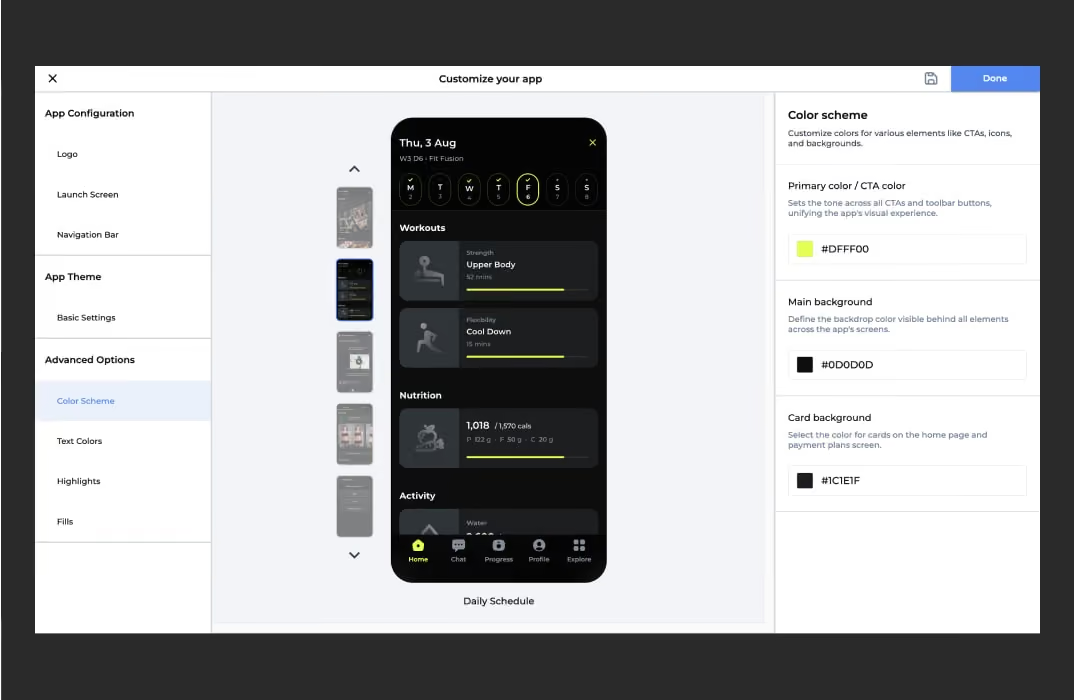
FitBudd's Advanced Options offer extensive controls to fine-tune every aspect of your app's appearance for those who want beyond basic customization. You can tweak everything from color schemes to text styles, ensuring your app matches your brand's aesthetic perfectly.
Color Scheme: Defining Your Brand's Palette
The color scheme is a fundamental aspect of your app's identity. FitBudd allows you to define primary colors for buttons and toolbar options, ensuring a consistent appearance throughout the app. You can also customize the main and card background colors, creating a cohesive look that reflects your brand's personality.
Text Color: Making Your Message Stand Out
Customizing text colors allows you to ensure that titles, descriptions, and other text elements align with your brand's style. Whether you prefer bold and vibrant or subtle and elegant, the text color options allow you to convey your message clearly and effectively.
Highlights: Adding Accents to Enhance the Experience
Highlights are the small details that make a big difference. FitBudd allows you to customize the look of non-clickable items, such as icons and progress bars. You can let the chosen app theme decide the highlight color, use your primary color, or select specific colors for different modules. This attention to detail ensures that every part of your app is visually cohesive and engaging.
Fills: Bringing Depth to Your Design
Fill options allow you to personalize the colors inside small cards on the homepage and the backgrounds of graphs, adding depth and dimension to your app's design. You can let the app theme decide the fill colors, define a single custom color, or enable module-specific fill options to create a dynamic and visually appealing interface.
Bringing Your Vision to Life: Saving & Publishing Changes
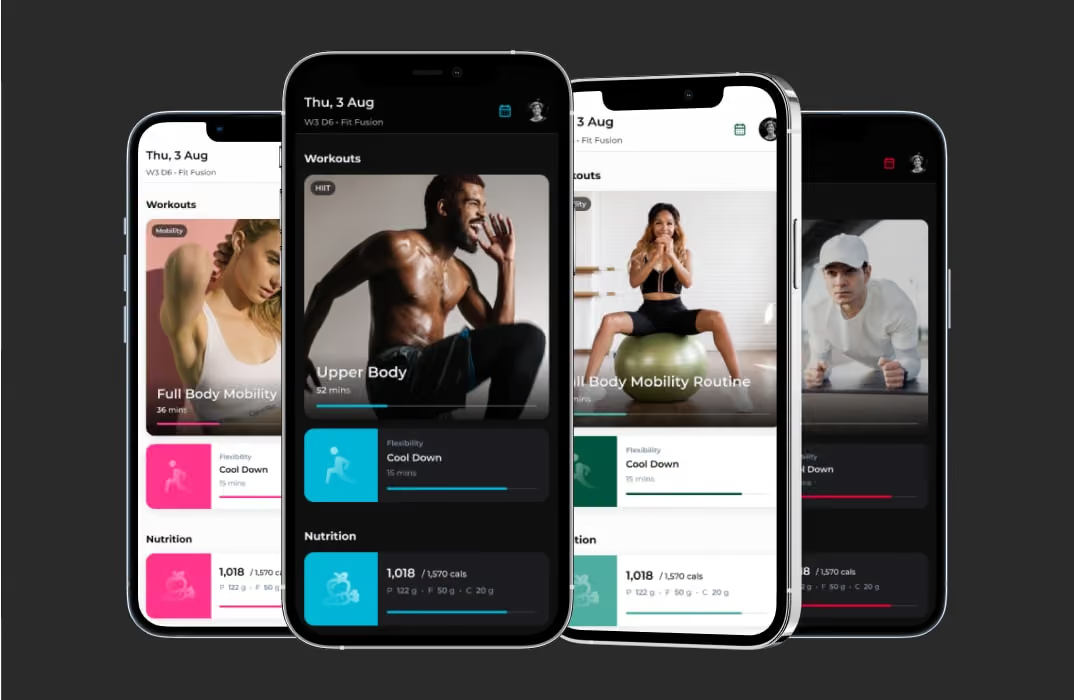
Once you've meticulously crafted your app's identity, it's time to bring it to life. FitBudd makes it easy to save and publish your changes. Simply click the save icon to preserve your work as a draft, or hit 'Done' to make your updates visible to your clients. This intuitive process ensures that your customizations are implemented smoothly, allowing you to showcase your brand's unique identity confidently.
In conclusion, the App Theme section in FitBudd offers powerful tools to paint your digital canvas with your brand's colors, style, and personality. By leveraging these customization options, you can create a fitness app that meets your client's needs and leaves a lasting impression, setting your fitness business apart in a competitive market.
Also read:
How Can a Fitness App Help Build Your Studio
Why Every Fitness Trainer Needs Their Own App | FitBudd
How To Grow With Your Coaching App Built With FitBudd
People Also Ask (PAA)
1. How can I customize my fitness app's appearance?
Customizing your fitness app's appearance is essential for aligning it with your brand identity. With FitBudd's App Theming feature, you can:
- Upload Your Logo: Personalize your app by adding your custom logo and header, ensuring a professional and branded experience for your clients.
- Select Brand-Aligned Colors: Choose primary colors for buttons, toolbar options, and backgrounds to create a cohesive look that reflects your brand's personality.
- Customize Text and Highlights: Adjust text colors and highlight accents to ensure that titles, descriptions, and other text elements align with your brand's style.
- Modify Backgrounds and Fills: Personalize the main and card background colors, as well as the fills inside small cards and backgrounds of graphs, adding depth and dimension to your app's design.
By leveraging these customization options, you can create a fitness app that meets your clients' needs and leaves a lasting impression, setting your fitness business apart in a competitive market.
2. What features does FitBudd offer for app theming?
FitBudd provides a comprehensive suite of app theming features to help you tailor your fitness app's appearance:
- Pre-Curated Templates: Choose from ready-made templates to perfectly capture your app's vibe and personality.
- Theme Modes: Select between light mode, dark mode, or a system mode that follows the settings on your clients' phones.
- Advanced Theme Options: Customize everything from pop colors to progress bar styles, making your app truly yours and matching it perfectly to your brand's vibe.
These features empower you to create a unique and engaging experience for your clients.
3. How do I upload my logo to FitBudd's app theming?
To upload your logo to FitBudd's app theming:
- Access Client App Settings: Navigate to the "Client App" option on your FitBudd dashboard and click on "Edit."
- Select App Configuration: Under the app configuration section, locate and select "Logo."
- Upload Your Logo: Click on the upload icon below "App logo" on the right-hand side of the panel. Ensure your logo is a 1024x1024 full square image without transparency.
- Preview Your Logo: In the center panel, preview how your logo will appear on iOS and Android devices.
By following these steps, you can ensure that your FitBudd app reflects your brand identity and provides a seamless experience for your clients.
4. Can I change the color scheme of my FitBudd app?
Yes, you can change the color scheme of your FitBudd app:
- Primary Color: Define the primary color for buttons and toolbar options to ensure a consistent appearance throughout the app.
- Main Background: Customize the main background color to set the tone for your app's interface.
- Card Background: Choose the color for the cards on the home and payment plans pages to align with your brand's style.
These customization options allow you to create a cohesive look that reflects your brand's personality.
5. Is it possible to add a custom splash screen to my FitBudd app?
Yes, you can add a custom splash screen to your FitBudd app:
- Full-Screen Background Image: Introduce a personal touch by customizing the splash screen with a full-screen background image that showcases your brand identity.
- Intro Video: Add an optional intro video to the splash screen to grab attention and make your app more memorable.



Meet the author
Aishwarya Mehra
With a passion for digital strategy and a keen eye for engagement, Aishwarya Mehra is your partner in turning clicks into clients and likes into loyal followers.
Frequently Asked Questions

Yangzey Sherpa leads content strategy at FitBudd, overseeing content planning and execution across fitness-focused digital channels. With over five years of experience in SEO and content, she works closely with the fitness industry to ensure content aligns with the needs of coaches, trainers, and gym owners. Her role keeps her deeply connected to fitness business workflows, coaching models, and how professionals use digital platforms to grow.


Apra Pathak has worked closely within the fitness niche for several years, supporting personal trainers and fitness coaches through content and digital marketing initiatives. Her experience centers on understanding how fitness professionals build visibility, communicate value, and engage clients online. Through sustained involvement with fitness-focused platforms and audiences, she has developed a strong understanding of the digital needs and growth challenges faced by modern fitness businesses.

Aishwarya Mehra has been actively involved in fitness-focused digital marketing, working closely with brands and platforms that serve coaches, trainers, and fitness businesses. Her experience spans engagement-driven strategies designed specifically for fitness audiences. Through ongoing exposure to fitness campaigns and communities, she remains closely aligned with how fitness professionals attract, convert, and retain clients in digital environments.

Suchandra Das has contributed content within the fitness niche, working on resources designed for coaches, trainers, and fitness business owners. Her experience involves supporting fitness-related topics with clear, structured, and accessible content. Through consistent involvement with fitness-focused platforms, she has developed familiarity with coaching workflows, client communication, and the informational needs of fitness professionals.
FitBudd is a fitness technology platform built exclusively for coaches, personal trainers, gym owners, and fitness professionals. The platform supports fitness businesses through branded apps, white-labeled solutions, and websites designed around real coaching and training workflows. FitBudd works closely with the global fitness community, maintaining deep, ongoing involvement in the fitness industry.

Ankit Uniyal has worked extensively with fitness-focused content, supporting platforms that cater to personal trainers, gym owners, and fitness professionals. His experience includes optimizing and structuring content around fitness-related search behavior and user intent. Through continued involvement in the fitness niche, he has gained a strong understanding of how trainers and coaches build discoverability and authority online.

Saumya Mittal is the Co-Founder and CEO of FitBudd. Since 2021, she has been actively engaged in the fitness technology sector, collaborating with global fitness companies to foster digital growth and scalable operations. With over a decade of experience leading high-impact projects in engineering and operations, Saumya has a strong background in developing reliable and scalable systems. Through FitBudd, she is dedicated to addressing the evolving needs of fitness professionals worldwide.

Kinshuk Snehi has been closely involved in the fitness space for over four years. Through his work at FitBudd, he has contributed to shaping how fitness professionals build their online presence, attract clients, and scale sustainable coaching businesses. Deeply interested in the intersection of fitness, technology, and growth, Kinshuk brings a hands-on understanding of the challenges faced by modern trainers. His passion lies in building systems and strategies that support long-term consistency, both in fitness journeys and business growth.

Kanika Verma has been closely involved in building solutions for the fitness industry, working with platforms used by coaches and trainers globally. Her experience includes direct exposure to fitness coaching workflows and operational needs. Through sustained involvement in fitness-focused product development, she has developed a strong understanding of how fitness professionals manage clients, programs, and daily operations.

Tanya Sharma has worked on branding initiatives within the fitness niche, supporting fitness platforms and businesses with visual identity design. Her experience includes creating brand systems used by coaches, trainers, and fitness-focused products. Through ongoing involvement in fitness-related design projects, she remains closely connected to how fitness brands communicate trust and professionalism.

Niharika Sonavane has contributed to visual design projects within the fitness industry, supporting platforms and brands serving fitness professionals. Her experience spans creating digital assets used across fitness apps, websites, and marketing materials. Through continued work in the fitness niche, she remains closely aligned with the visual communication needs of coaches and fitness businesses.

Elesh Patel has worked extensively on marketing initiatives within the fitness niche, managing paid campaigns for fitness-focused products and services. His experience includes supporting platforms that target personal trainers, gym owners, and fitness creators. Through long-term involvement in fitness marketing, he remains closely connected to how fitness professionals discover and adopt digital tools.


Retain Your Fitness Clients Guide
Learn strategies to keep your clients motivated and committed to their fitness journey with our comprehensive guide.
Download Now
Templates
These functional templates have the power to make any fitness trainer's life easier.
Subscribe To
Our Blog