


Are You Earning Up to Your Potential?
Most personal trainers are undervaluing their time and skills. Our Personal trainer Revenue Calculator helps you find out what you should be making, and how to get there.
No guesswork. Just real numbers.
.webp)
TL;DR
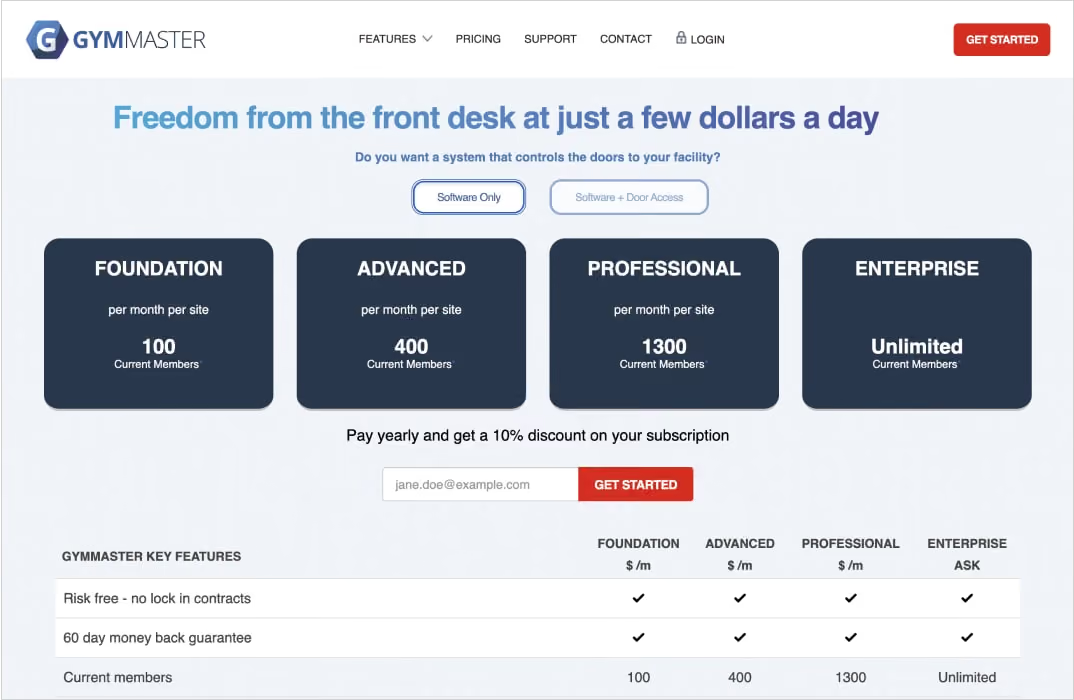
GymMaster costs $89 to $209 per site monthly for software only, or $129 to $249 with 24/7 door access control, with tiers set by member count. Hardware is priced separately, from $1.30 per key fob to $550 for the main controller. Every plan includes a member app; branding it costs $150 a month plus a $450 setup fee, and there's no lock-in contract, backed by a 60-day money-back guarantee.
Gym management software is the system that holds your member records, recurring billing, bookings and check-ins in one place, and GymMaster is one of the better-known options in that category. It is built for facilities rather than coaches, and its defining feature is that it sells the door hardware as well as the software.
This guide covers what it does, what it actually costs once hardware is included, who it suits, and where it stops being the right tool.
What Is Gym Management Software?
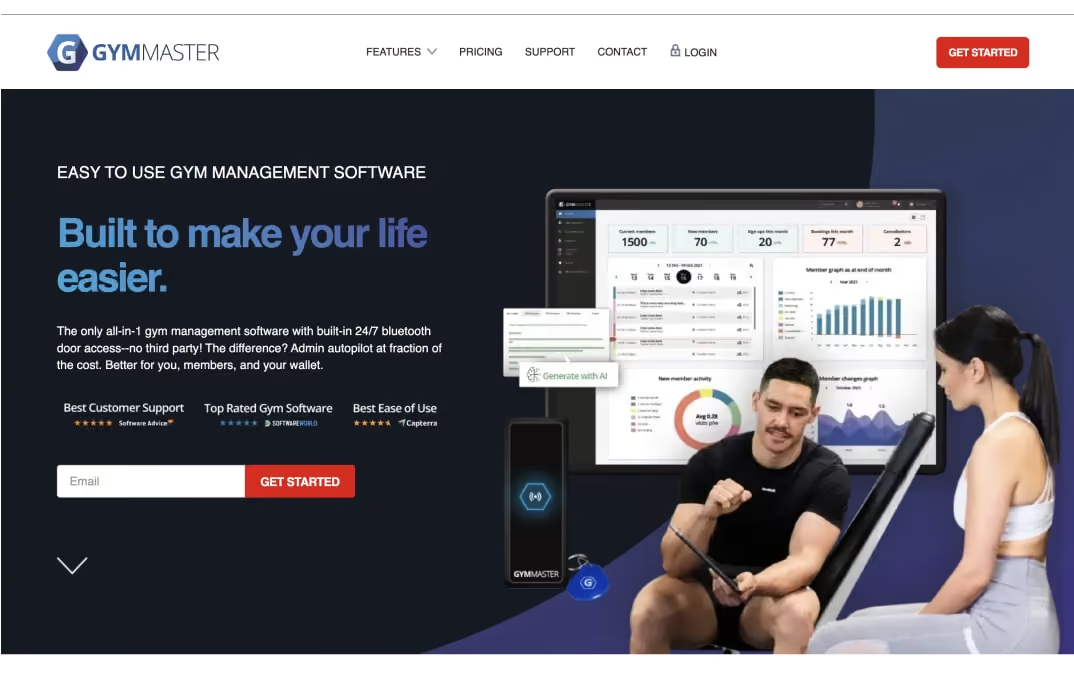
Gym management software is a platform that automates the administrative side of running a fitness business: membership records, recurring billing, class and appointment scheduling, check-ins, point-of-sale, and reporting.
Instead of a spreadsheet for members, a separate booking tool, and a payment processor that doesn't talk to either, one system holds it all and keeps it all in sync. That's the core job of any gym software worth paying for.
The category splits into two rough types, and knowing which one you are shopping for saves a great deal of time. Facility-first platforms are built around the building: who is a current member, are they paid up, and can they get through the door? Coaching-first platforms are built around the client relationship: programming, check-ins, nutrition, and communication between sessions.
Most gyms need more of one than the other, and a growing number need both, which is why a proper gym CRM software setup increasingly matters more than the booking calendar it replaced.
Across the category, gym management software costs anywhere from nothing to several hundred dollars a month. Free tiers are rarely free in practice, because the platform usually recovers the cost through higher card processing rates instead. A gym with a couple hundred members typically lands in the low-to-mid hundreds per month once you factor in processing.
💪 Got an idea for a brand? Let's bring it to life.
Launch your own fitness app with FitBudd in minutes!

💪 Got your brand name? Let’s bring it to life.
Launch your own fitness app with FitBudd in minutes!



88% trainers worldwide gave us 5 stars
Transform your fitness business with the power of your branded app on iOS and Android.
Try for FREEWhat Should You Look For in Gym Management Software?

Work through these before you look at a single demo. They narrow the field faster than any feature list. — whichever gym management software you're evaluating.
- Member limits and how they are counted
Most platforms tier by member count, and definitions vary. Ask specifically whether $0 memberships, future-dated signups and concession cardholders count toward your limit, because that determines which tier you actually land on.
- Access control
If you run unattended hours, decide early whether you want the software vendor to supply the door hardware as well. First-party hardware is simpler to support. Third-party integration gives you more freedom later.
- Scheduling and booking depth
Class booking, PT appointments and resource booking are three different features. If packed classes drive your revenue, judge gym scheduling software on waitlist handling and capacity rules, not on whether it has a calendar.
- Payment processing
Ask what percentage you pay per transaction and whether you can bring your own provider. At $15,000 a month in member payments, a one-point difference in processing is $1,800 a year.
- Who the member app belongs to
A vendor-branded app is fine if members only use it to book classes. If you sell coaching through it, branding matters, and white-labeling is usually a paid add-on.
- Per-site versus per-account pricing
A second location can mean a second full subscription. Check before you sign, not before you expand.
- Contract terms
Lock-in periods, cancellation notice, and whether there is a money-back window.
- Migration cost
Card authorizations rarely transfer between processors, so switching often means collecting payment details again from your entire member base.
There is no single best gym management software, only the one that matches how your revenue actually arrives. FitBudd's guide to choosing gym management software explains how these criteria interact across different gym sizes.
What Is GymMaster Software?
GymMaster is gym management software built by Treshna Enterprises, a New Zealand company. It serves gyms, health clubs, studios and sports facilities, from single sites to franchises, and it is aimed squarely at facility operations rather than one-to-one coaching. It's sometimes searched as two words, “Gym Master,” but the platform's real name is one word.
What separates it from most of the category is that door access control is a first-party product. GymMaster manufactures and sells the controller, the readers and the key fobs, and they connect directly to the membership database rather than through an integration layer. When a membership lapses, entry permission changes with it, with no nightly sync and no second vendor to call when someone is locked out at 5 am.
That design explains its customer base. If your gym is staffed during all opening hours and members walk past a front desk, access control is a convenience. If you run unattended hours, it is the reason the business model works, which is why GymMaster appears consistently in shortlists of 24-hour gym software alongside much larger platforms. GymMaster holds a 4.7 out of 5 rating from 171 Capterra reviews as of September 2026.
What Features Does GymMaster Offer?
Every plan of this gym management software, from Foundation to Enterprise, includes the same core feature set. The tiers differ by member capacity, not functionality, which is unusual in this category and works in a small gym's favor.
- Membership management
Member records, contract terms, billing status, attendance history and visit logs.
- Automated billing and integrated payment processing
Recurring billing, failed payment retries, overdue reminders, and aggregated billing for linked members such as families.
- 24/7 door access control
Unlimited doors, available only on the Software plus Access Control plans. Time restrictions per membership type, and entry permissions tied to live billing status.
- Booking and scheduling
Classes, personal training sessions, and bookable club resources.
- Mobile member app
Available on iOS and Android on every plan. Members book classes, view schedules, manage their profile and receive push notifications.
- Point of sale and inventory management
Retail sales, stock control and supplement or merchandise tracking.
- Online signups and website integration
Timetables, inquiry forms and join-online flows embedded into your existing site.
- Automation and marketing
Automated email, push notifications, retention campaigns, and automated tasks and events.
- Reporting
Real-time reporting on revenue, attendance, membership growth and churn, plus franchise-level reporting.
- Staff timesheet tracking
Clock-in and hours tracking for gym staff.
- AI template writing assistant
Included, though it requires your own paid OpenAI account to function.
- Third-party integrations
Capterra lists around ten, including Mailchimp, PayPal, GoCardless, Paysafe, Xero, WordPress, Zoom and Zapier.
- Tailgating detection
A camera-based system that flags members letting others in behind them, sold as separate hardware with its own monthly fee.
Two things are Enterprise-only: dedicated hosting and SLA agreements. Everything else, including franchise reporting and paid customization, is available on the entry plan.
How Much Does GymMaster Cost?
Like most gym management software, GymMaster charges per site per month, excluding tax, and tiers are set by current member count. Two pricing tracks depend on whether you want the software to control your doors.
Software only
Software with 24/7 door access control
Paying annually takes 10% off the subscription. Prices are quoted in USD, AUD and NZD, and Canadian customers are quoted and billed in US dollars.
One point causes genuine confusion when comparing GymMaster against other platforms: $129 appears twice. It is the price of Advanced software-only, and it is also the price of Foundation with door access. Third-party listing sites routinely quote one and label it the other. Check which column you are reading.
Hardware charged separately and one-off unless noted
Branding costs
The customizable member portal is included on all plans. Going further costs extra: a branded member app is $150 per month plus a $450 setup fee, branded Bluetooth readers carry a $700 setup fee, and branded key fobs run from $1.30 per tag plus $170 per 500.
Two costs are easy to miss. GymMaster charges an additional monthly fee if you use non-GymMaster hardware or key tags, so mixing in existing readers is penalized. SMS is billed at a flat rate per message that varies by region and is quote-only.
Work a realistic example. A 24/7 gym with 250 members and three doors pays $169 a month for Advanced with access control, plus $550 for the Gatekeeper, $900 for three door readers and around $325 for 250 key fobs. That is roughly $1,775 up front and $2,028 in the first year of subscription, before card processing.
Here's how that first-year number breaks down:
Processing is the number most gym owners underestimate. GymMaster lets you bring your own billing provider instead of forcing you onto its own rails, which is a real advantage over free-tier platforms that charge nothing monthly but recover it through markedly higher transaction rates. If controlling that line is the actual goal, FitBudd's breakdown of gym POS and payments compares how the fee structures differ.
What Are the Pros and Cons of GymMaster?

Every gym management software comes with tradeoffs, and GymMaster is no exception.
Pros
- Access control that genuinely works unattended
First-party hardware wired to live membership status. This is the platform's strongest argument and why most customers chose it.
- Feature parity across tiers
A 90-member gym gets the same functionality as a 1,200-member one. Most competitors gate features behind higher plans.
- Well-reviewed support
Long-tenured reviewers on Capterra repeatedly credit the support team with adapting the system to their setup rather than declining the request.
- Fair contract terms
No lock-in and a 60-day money-back guarantee, in a category where annual contracts and quote-only pricing are common.
- Bring your own payment processor
Around ten integrations including GoCardless, PayPal and Paysafe, rather than a single mandatory rail.
Cons
- The member app looks dated
This is the most consistent criticism across review sites. It works, but it is visibly behind newer platforms, which matters if you intend to sell coaching through it.
- Hardware peripherals are fussy
One Capterra reviewer running a six-year deployment reported you cannot use an iPhone or iPad to connect a swiper for cc, alongside POS limits on multi-component products.
- Price climbs with add-ons
A G2 reviewer described the pricing as on the higher end compared to other gym management software, which is fair once you factor in hardware and branded app fees.
- Per-site billing
A second location is a second subscription, not a seat upgrade.
- Admin friction at scale
Contracts cannot be duplicated, so gyms running many membership variants rebuild each one manually.
- Setup has a learning curve
Day-to-day use is straightforward for front-desk staff, but configuration and migration take real time from the person who owns the system.
Who Is GymMaster Best For?
As gym management software, GymMaster is a strong fit if you run a 24/7 or partially unattended facility, your revenue comes from memberships and floor access, and you want one vendor accountable for both the software and the doors. For a single-site gym in that shape, pricing is reasonable, and feature parity across tiers works in your favor.
It is a weaker fit in three situations. If your business is coaching-led and you sell programming, check-ins and nutrition rather than floor access, GymMaster treats all of that as peripheral and your members will notice in the app. If you operate several locations, per-site billing compounds faster than seat-based models.
If your brand is a meaningful part of what members are buying, $150 a month plus setup for a white-labeled version of an app that reviewers already call dated is a hard case to make. Boutique operators in that third group usually end up looking at fitness studio software compared rather than facility-first tools.
How Do You Log In to GymMaster?
GymMaster does not use a single shared login page. Each gym gets its own subdomain on gymmasteronline.com, so the address follows the pattern yourgymname.gymmasteronline.com, with a portal path for members and a separate staff login for the same site. Searching for a generic GymMaster login won't get you anywhere — it only works once you know your own gym's subdomain.
The GymMaster staff login sits on that same subdomain and opens the admin portal, where staff manage memberships, bookings, POS and reporting. Members use either the member portal on that same subdomain or the GymMaster member app on iOS and Android, where they can book classes and PT sessions, update their profile photo and details, view booking history and receive push notifications from the gym.
If you cannot find your gym's address, it is faster to ask the gym directly than to search for it, because the subdomain is specific to that facility.
How to Cancel a GymMaster Membership
This depends on which kind of membership you mean, and the two are frequently confused.
If you are a gym member
You don't cancel with GymMaster. GymMaster is the software your gym runs, not the company holding your membership agreement. Cancellation terms, notice periods and any exit fees are set by your gym, so contact the gym directly. Some gyms enable self-service cancellation through the member portal, but many do not, and neither GymMaster support nor deleting the app will end your billing.
If you are a gym owner canceling your GymMaster subscription
There is no lock-in contract to exit. New customers are covered by a 60-day money-back guarantee, and GymMaster maintains a cancellation page on its site to complete the process. The harder part is not the contract; it is the hardware: if GymMaster readers are installed on your doors, leaving means either replacing them or running a separate access-control vendor alongside your new platform.
Export member records, billing history, and active subscriptions before you close the account, and plan to re-collect payment details from your member base, because card authorizations generally do not transfer between processors.
Managing Clients as a Solo or Hybrid Coach?
If most of your revenue comes from coaching rather than floor access, a facility platform solves a problem you don't have. You are not trying to control a door at 5 am. You are trying to keep thirty or eighty clients programmed, checked in on, and paying, without the admin eating your evenings. Most of that risk sits in the first 90 days, before structured exercise becomes a habit, and the admin grind behind it is a well-documented driver of coach burnout.
A facility-first gym management software like GymMaster solves a different problem than the one most hybrid coaches actually have. That is the gap FitBudd fills. FitBudd gives coaches, personal trainers and hybrid gym operators a personal training app carrying their own brand on iOS and Android, with workout programming, nutrition plans, progress tracking, in-app messaging, video calling and direct client payments in one place. Members download your app rather than a vendor's, which changes how the coaching relationship feels between sessions.
It is worth being straight about the tradeoff: FitBudd does not sell door hardware. If unattended access is the reason you are shopping for software, that is a problem FitBudd does not solve, and GymMaster does. Plenty of gyms run both, keeping access control on one system and coaching on another.
Launch your branded coaching app in minutes. Start your free trial, no credit card required.



Meet the author
Apra Pathak
Meet Apra Pathak, a social media virtuoso and expert blogger dedicated to helping personal trainers thrive digitally.
Frequently Asked Questions

Yangzey Sherpa leads content strategy at FitBudd, overseeing content planning and execution across fitness-focused digital channels. With over five years of experience in SEO and content, she works closely with the fitness industry to ensure content aligns with the needs of coaches, trainers, and gym owners. Her role keeps her deeply connected to fitness business workflows, coaching models, and how professionals use digital platforms to grow.


Apra Pathak has worked closely within the fitness niche for several years, supporting personal trainers and fitness coaches through content and digital marketing initiatives. Her experience centers on understanding how fitness professionals build visibility, communicate value, and engage clients online. Through sustained involvement with fitness-focused platforms and audiences, she has developed a strong understanding of the digital needs and growth challenges faced by modern fitness businesses.

Aishwarya Mehra has been actively involved in fitness-focused digital marketing, working closely with brands and platforms that serve coaches, trainers, and fitness businesses. Her experience spans engagement-driven strategies designed specifically for fitness audiences. Through ongoing exposure to fitness campaigns and communities, she remains closely aligned with how fitness professionals attract, convert, and retain clients in digital environments.

Suchandra Das has contributed content within the fitness niche, working on resources designed for coaches, trainers, and fitness business owners. Her experience involves supporting fitness-related topics with clear, structured, and accessible content. Through consistent involvement with fitness-focused platforms, she has developed familiarity with coaching workflows, client communication, and the informational needs of fitness professionals.
FitBudd is a fitness technology platform built exclusively for coaches, personal trainers, gym owners, and fitness professionals. The platform supports fitness businesses through branded apps, white-labeled solutions, and websites designed around real coaching and training workflows. FitBudd works closely with the global fitness community, maintaining deep, ongoing involvement in the fitness industry.

Ankit Uniyal has worked extensively with fitness-focused content, supporting platforms that cater to personal trainers, gym owners, and fitness professionals. His experience includes optimizing and structuring content around fitness-related search behavior and user intent. Through continued involvement in the fitness niche, he has gained a strong understanding of how trainers and coaches build discoverability and authority online.

Saumya Mittal is the Co-Founder and CEO of FitBudd. Since 2021, she has been actively engaged in the fitness technology sector, collaborating with global fitness companies to foster digital growth and scalable operations. With over a decade of experience leading high-impact projects in engineering and operations, Saumya has a strong background in developing reliable and scalable systems. Through FitBudd, she is dedicated to addressing the evolving needs of fitness professionals worldwide.

Kinshuk Snehi has been closely involved in the fitness space for over four years. Through his work at FitBudd, he has contributed to shaping how fitness professionals build their online presence, attract clients, and scale sustainable coaching businesses. Deeply interested in the intersection of fitness, technology, and growth, Kinshuk brings a hands-on understanding of the challenges faced by modern trainers. His passion lies in building systems and strategies that support long-term consistency, both in fitness journeys and business growth.

Kanika Verma has been closely involved in building solutions for the fitness industry, working with platforms used by coaches and trainers globally. Her experience includes direct exposure to fitness coaching workflows and operational needs. Through sustained involvement in fitness-focused product development, she has developed a strong understanding of how fitness professionals manage clients, programs, and daily operations.

Tanya Sharma has worked on branding initiatives within the fitness niche, supporting fitness platforms and businesses with visual identity design. Her experience includes creating brand systems used by coaches, trainers, and fitness-focused products. Through ongoing involvement in fitness-related design projects, she remains closely connected to how fitness brands communicate trust and professionalism.

Niharika Sonavane has contributed to visual design projects within the fitness industry, supporting platforms and brands serving fitness professionals. Her experience spans creating digital assets used across fitness apps, websites, and marketing materials. Through continued work in the fitness niche, she remains closely aligned with the visual communication needs of coaches and fitness businesses.

Elesh Patel has worked extensively on marketing initiatives within the fitness niche, managing paid campaigns for fitness-focused products and services. His experience includes supporting platforms that target personal trainers, gym owners, and fitness creators. Through long-term involvement in fitness marketing, he remains closely connected to how fitness professionals discover and adopt digital tools.



Workout Schedule & Progress Tracker Template
Stay on top of your fitness game with our customizable tracker to monitor progress and plan workouts.
Download Now
Templates
These functional templates have the power to make any fitness trainer's life easier.
Subscribe To
Our Blog





